Wednesday, October 8, 2025

Newest critical NextJS vulnerability
Navigation
    Run Express App Security Scan - It's Free. How Many Stars Does Your App Get?

    Application security has become more critical than ever in today's digital landscape, marking a significant milestone in the field. With cyber threats evolving rapidly, organizations need robust frameworks to secure their web applications and services. The Open Web Application Security Project (OWASP) has answered this call with the release of the Application Security Verification Standard (ASVS) version 5.0, officially launched at Global AppSec EU Barcelona 2025.

    What is OWASP Application Security Verification Standard v5?

    The OWASP Application Security Verification Standard (ASVS) v5.0 is a comprehensive framework that provides a comprehensive set of approximately 350 application security verification requirements across 17 categories for designing, developing, and testing modern web applications and web services. Originally launched in 2008, this latest stable version represents comprehensive restructuring with refined security requirements and enhanced usability for broader adoption.

    The primary aim of ASVS v5 is to provide an open application security standard for web applications and services of all types, following a structured approach that helps development teams satisfy application security requirements systematically. The framework serves to provide guidance as security architecture guidance for building secure applications, development standards offering comprehensive secure coding checklists for developers, and a testing framework enabling consistent security verification across organizations.

    Major Changes and Improvements in OWASP ASVS 5.0

    Category

    ASVS v4.0.3

    ASVS v5.0

    Release Context

    Last major update 2019; v4.0.3 minor revision in 2021.

    First big revision in 6 years, released 2024.

    Number of Requirements

    286 requirements.

    350 requirements.

    Chapters

    14 chapters.

    17 reorganized chapters.

    Requirement Numbering

    Static numbering since v4 release.

    Completely renumbered and reordered; two-way migration mapping provided.

    Verification Levels (L1–L3)

    L1 had 131 requirements, considered too heavy. L2 and L3 very close (20 more at L3). L1 implied black-box testing.

    Levels simplified and rebalanced. L1 is lighter and achievable, L2 and L3 scaled more logically. Explicitly states black-box is not sufficient at any level.

    Control Organization

    Some overlap and duplication; controls not always grouped by risk.

    Deduplicated, rewritten, grouped more logically by risk and category.

    Mappings (CWE, NIST, etc.)

    Direct mappings embedded in main document (hard to maintain).

    Mappings moved to separate section; long-term handled by OWASP CRE (Common Requirement Enumeration).

    Explanatory Guidance

    Inline rationale and explanations within requirements.

    Requirement text streamlined; guidance moved to end of document for readability.

    New Topics Added

    No coverage of AI, quantum, or modern crypto.

    Post-quantum crypto planning (e.g., 11.1.4 at L3). - Organizational documentation of security decisions.

    Deprecated / Removed Controls

    Some impractical or outdated requirements kept, such as: - 32-bit salt minimum. - Unicode in password complexity. - Zeroing memory after use.

    Focus only on relevant, testable, high-impact controls.

    Verification Approach

    Ambiguity — black-box implied at L1, though noted as weak.

    Clear stance: meaningful verification requires internal access. Black-box alone = insufficient.

    Usability / Adoption Focus

    High barrier at L1, guidance mixed, adoption difficult for small teams.

    Lower barrier to entry. Easier adoption path: start at L1 and progress naturally.

    Examples of Requirement Updates

    Password rules and Cryptography still mentioned older practices.

    Updated password rules align with NIST SP 800-63. Outdated crypto (SHA-1, short salts) removed.

    Breakdown of the 17 Security Controls in ASVS v5

    ASVS v5 organizes security requirements into 17 comprehensive categories addressing critical aspects of application security:

    1. Architecture, Design and Threat Modeling

    This foundational category ensures security is embedded from the architectural level, requiring secure design principles and comprehensive threat modeling for all application components.

    2. Authentication

    Digital identity verification forms the cornerstone of application security, requiring robust authentication mechanisms including multi-factor authentication and secure credential handling processes.

    3. Session Management

    Secure session handling prevents session hijacking and unauthorized manipulation through proper lifecycle management, including secure token generation and CSRF protection.

    4. Access Control

    Authorization ensures users access only entitled resources, preventing privilege escalation through role-based access control (RBAC) and principle of least privilege enforcement.

    5. Validation, Sanitization and Encoding

    Input validation and output encoding prevent injection attacks, encompassing SQL injection prevention, cross site scripting (XSS) protection, and parameterized query frameworks to verify that the application protects against common vulnerabilities.

    6. Stored Cryptography

    Cryptographic implementation protects data confidentiality through proper encryption, secure key management, and certificate handling following the latest advances in software security.

    7. Error Handling and Logging

    Secure error handling prevents information disclosure while ensuring that functionality includes comprehensive logging that enables incident response and security monitoring for secure applications.

    8. Data Protection

    Data protection ensures sensitive information handling meets privacy requirements and compliance standards through classification systems and retention policies.

    9. Communication

    Secure communication protects data in transit through proper TLS implementation, certificate validation, and secure protocol usage for web applications and services.

    10. Malicious Code

    Protection against malicious code prevents OS command injection and unsafe execution. Organizations must verify that operating system calls use parameterized OS queries or contextual encoding.

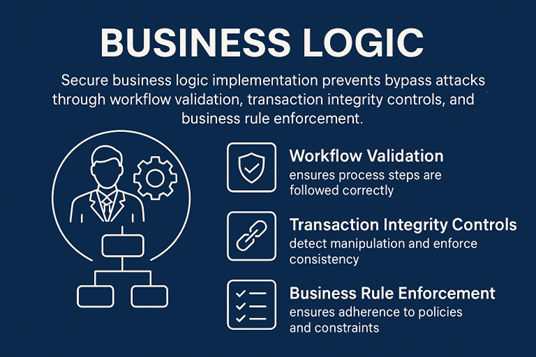
    11. Business Logic

    Implementing secure business logic helps prevent bypass attacks by enforcing workflow validation, ensuring transaction integrity, and applying strict business rules.
    12. Files and Resources

    Secure file handling prevents file-based attacks through proper upload mechanisms, validation, and resource consumption controls.

    13. API and Web Service

    API security addresses REST, GraphQL, and web service security requirements including authentication, rate limiting, and input validation for endpoints.

    14. Configuration

    Secure configuration eliminates vulnerabilities through proper application and infrastructure configuration management and security header implementation.

    15. WebSockets

    WebSocket security addresses real-time communication requirements including authentication mechanisms and message validation for persistent connections.

    16. Mobile

    Mobile application security addresses platform-specific threats and security requirements unique to mobile environments and mobile-specific authentication.

    17. Business Objects

    Business object security ensures integrity of critical business data through access controls, data verification, and object manipulation security.

    ASVS v5.0 Control Updates and Additions

    Category

    ASVS v4.0.3

    What Changed / Why It Matters

    ASVS v5.0 (New / Updated Control)

    1. Architecture, Design & Threat Modeling

    Threat modeling mentioned briefly; no mandate to document decisions.

    Now explicitly requires documenting security design rationale for transparency and auditability.

    1.4.3 – Document Security Design Decisions

    Threat modeling limited to core components.

    Expanded to include AI models, third-party libraries, and external integrations.

    1.5.1 – Threat Modeling for All Components (AI, 3rd-Party)

    2. Authentication

    Focused on passwords and MFA; no modern protocol coverage.

    Introduces modern passwordless authentication and federation standards.

    2.2.4 – Support for OIDC, FIDO2, and Passkeys

    3. Session Management

    Token handling limited to creation and expiration.

    Adds lifecycle management and reuse prevention for stolen tokens.

    3.2.2 – Token Revocation & Replay Prevention

    4. Access Control

    Static RBAC validation; no dynamic re-evaluation.

    Requires real-time authorization enforcement throughout user sessions.

    4.1.3 – Continuous Authorization Checks

    6. Stored Cryptography

    Focused on key management and approved algorithms only.

    New control for assessing readiness and documenting PQC migration strategy.

    6.1.4 – Post-Quantum Cryptography Planning (L3)

    7. Error Handling & Logging

    Logging coverage generic and distributed.

    Requires aggregation of security logs for SIEM and incident response integration.

    7.2.1 – Centralized Security Event Logging

    8. Data Protection

    No explicit link to privacy regulations.

    Adds privacy mapping and classification requirements for regulated data.

    8.3.2 – Data Classification for Privacy Compliance (GDPR/CCPA)

    10. Malicious Code

    Only covered unsafe code execution and injection.

    Introduces supply chain integrity verification using SBOM or equivalent.

    10.2.3 – Dependency Integrity Verification (SBOM)

    13. API & Web Services

    Limited REST API validation guidance.

    New control requiring schema-based validation of all API inputs/outputs.

    13.3.1 – API Schema Validation

    No rate-limiting guidance.

    Adds explicit DoS and brute-force mitigation control for APIs.

    13.3.3 – Rate Limiting Enforcement

    14. Configuration

    Focused on runtime and environment configuration.

    Extends configuration security to DevOps pipelines and IaC tools.

    14.2.3 – Infrastructure-as-Code (IaC) Security Controls

    15. WebSockets

    Not covered in v4.

    Entirely new category addressing persistent connection security.

    15.1.1 – WebSocket Authentication, 15.1.2 – Message Validation & Integrity

    16. Mobile

    Light overlap with MASVS; minimal detail.

    Strengthens mobile data protection and cert-pinning verification.

    16.3.1 – Secure Storage of App Secrets, 16.3.2 – Certificate Pinning Verification

    17. Business Objects

    Not included in v4.

    Introduces data-centric integrity and authorization checks for core business entities.

    17.2.1 – Object Integrity Validation, 17.3.1 – Data Manipulation Authorization

    Conclusion

    OWASP ASVS v5 represents a major release and significant milestone in application security standards, addressing implementation challenges while maintaining comprehensive security coverage. The lowered entry barriers with Level 1 requirements make ASVS v5 accessible to organizations of all sizes.

    This version introduces modern security practices that align with emerging technologies such as AI, cloud-native architectures, and API-first design. It emphasizes practical applicability, improved control clarity, and stronger alignment with industry frameworks like NIST and ISO. By refining its structure and expanding control coverage, ASVS v5 helps teams integrate security earlier in the development lifecycle and achieve greater consistency in verification and compliance efforts. 

    How? Cyber Chief helps you map your applications to ASVS v5, identify vulnerabilities, and implement best-practice controls in minutes, not days.

    Watch the Cyber Chief on-demand demo to see how.

    Cyber Chief is built to integrate seamlessly into development workflows and offers:

    • Automated ASVS v5 coverage scans your applications for vulnerabilities across authentication, access control, session management, cryptography, and more, including alignment with OWASP Top 10 risks.

    • Detailed control analysis highlights areas where security policies or configurations are weak, overly permissive, or non-compliant.

    • Risk-based prioritization helps you understand which security gaps pose the greatest threat to your users and data.

    • Actionable remediation guidance provides step-by-step recommendations, including code examples, for implementing ASVS v5 controls.

    • Expert support on demand gives you access to security coaching to implement robust security controls efficiently, reducing risk across your application stack.

    Click the green button below to see how Cyber Chief works.


    Tuesday, September 23, 2025

    Newest critical NextJS vulnerability
    Navigation
      Run Express App Security Scan - It's Free. How Many Stars Does Your App Get?

      Running security scans has become a daily task for DevOps engineers, IT teams, and cybersecurity professionals. Most of the time, these scans are straightforward and highlight minor issues. Occasionally, a red flag appears that causes concern. One of the most common and misunderstood results is a failed TLS test or SSL certificate errors, especially when the ssl certificate installed is not properly configured.

      It is easy to treat this as an urgent problem. TLS and SSL certificates are responsible for keeping communications private, encrypted, and trusted. Without them, sensitive data such as passwords, payment details, or personal information could be intercepted or modified. However, a failed TLS test is rarely a sign of an active compromise, and understanding what the error means is crucial.

      More often, it indicates that your system is supporting outdated protocols, weak cipher suites, or has misconfigurations in the SSL certificate chain. Understanding exactly what the scan is reporting allows you to address the issues effectively and maintain a secure connection for your users.

      This comprehensive guide explains what TLS failures mean, why they happen, and how to fix SSL certificate errors without panic.

      Why SSL Certificate Errors Occur

      SSL certificate errors and TLS test failures can occur for several reasons. The most common are:

      Outdated TLS Versions

      Older TLS versions, such as TLS 1.0 and TLS 1.1, are no longer considered secure. Security scanners and modern browsers flag them even if clients rarely use them. Supporting these outdated protocols can result in SSL protocol error messages or generic ssl protocol error notifications.

      TLS 1.2 is now the minimum standard for secure communication. TLS 1.3 provides additional security and improved performance. If a scan reports support for TLS 1.0 or TLS 1.1, it usually means that the server has not explicitly disabled these protocols. Many modern browsers will refuse to connect with them. Their presence can still affect SSL certificate not trusted errors.

      Weak Cipher Suites

      Cipher suites are the algorithms that TLS and SSL use to encrypt communications. Older ciphers such as RC4 or MD5 are considered weak and vulnerable. If your server still lists them as supported, scanners will flag this as a vulnerability.

      Common messages include:

      • SSL routines: ssl_choose_client_version: unsupported protocol

      • SSL handshake failure

      • SSL connection error

      Weak cipher suites can also cause a mismatch error, contributing to an ssl connection error if the server and client cannot agree on an encryption algorithm during the SSL handshake.

      Common SSL Certificate Errors

      Certificate-related problems are one of the most frequent causes of SSL certificate errors, including expired SSL certificates that trigger error messages, self-signed certificates that result in not trusted errors, domain mismatch errors when the certificate does not match the requested website, revoked certificates that have been compromised, missing intermediate certificates in the chain, and issues with the overall certificate chain.

      When a certificate is expired, not installed correctly, or issued by an untrusted certificate authority, users may see a particular error message in their browsers. Examples include messages like "Your connection is not private" or "Website's SSL certificate is not trusted."

      Intermediate Infrastructure Issues

      Even if the application server is properly configured, traffic may pass through a load balancer, content delivery network, or proxy that allows older protocols or weak ciphers. In these cases, SSL/TLS tests may report outdated versions despite your web server being secure. Tracing the full request path is necessary to identify where the insecure configuration exists, which may involve examining the root certificate.

      Understanding SSL Errors and Certificate Status

      How SSL Certificate Error Occurs

      An SSL certificate error occurs when there's a mismatch between what's expected and what's presented during the SSL handshake process, which could be due to certificate status issues such as expired, revoked, or invalid certificates, a name mismatch when the certificate does not cover the domain, missing intermediate certificates in the chain, or problems with the private key not matching the server certificates.

      Browser Security Certificate Handling

      Modern browsers handle security certificate validation strictly. When your security certificate expires or has other issues, browsers will display warnings that can prevent users from accessing your site. The padlock icon may disappear or show as not secure, affecting user trust and website credibility.

      Browser Behavior and SSL Errors

      How Modern Browsers Handle SSL Certificate Issues

      Modern browsers such as Chrome, Firefox, Safari, and Edge display prominent warnings when encountering SSL certificate errors. These warnings often prevent users from proceeding to the website. Common examples include:

      • NET::ERR_CERT_DATE_INVALID for expired SSL certificate situations

      • NET::ERR_CERT_AUTHORITY_INVALID for self signed certificates or untrusted authority issues

      • NET::ERR_CERT_COMMON_NAME_INVALID for name mismatch errors

      The absence of a padlock icon or presence of security warnings in the address bar can discourage users from trusting your site. Addressing these warnings quickly is essential for maintaining security and user confidence.

      Understanding Browser Security Certificate Validation

      Browsers perform multiple checks during certificate validation:

      • Certificate status verification

      • Chain certificates validation

      • Revocation status checking

      • Domain name matching

      • Certificate's validity period verification

      When any check fails, the browser may display a "not trusted error" or prevent access entirely.

      How to Fix SSL Certificate Errors

      To address TLS and SSL errors effectively, configure your web servers to allow only secure protocols and strong cipher suites.

      Example Web Server Configurations

      Nginx Configuration:

      ssl_protocols TLSv1.2 TLSv1.3;
      ssl_ciphers HIGH:!aNULL:!MD5:!RC4;
      ssl_prefer_server_ciphers on;
      

      Apache Configuration:

      SSLProtocol TLSv1.2 TLSv1.3
      SSLCipherSuite HIGH:!aNULL:!MD5:!RC4
      SSLHonorCipherOrder on
      

      Restart your web server after updating the configuration and re-run the SSL/TLS test using Cyber Chief. Most SSL errors should disappear.

      Certificate Chain Management

      Ensure your certificate chain is complete. This includes:

      • Root certificate from the trusted certificate authority

      • Any intermediate certificates in the proper order

      • Your server certificate with matching private key

      Missing intermediate certificates often trigger SSL certificate errors and certificate not trusted error messages in browsers. Always verify that your installed SSL certificate includes the complete chain certificates.

      Fixing Specific SSL Certificate Issues

      Expired SSL Certificate Error

      When dealing with an expired SSL certificate, you need to:

      1. Obtain a new SSL certificate from your certificate authority

      2. Generate a new certificate signing request if required

      3. Install the new SSL certificate on your web server

      4. Update the certificate's validity period in your monitoring systems

      5. Test the secure connection to ensure the expired certificates are replaced

      SSL Certificate Not Trusted Errors

      These not trusted errors typically occur when self-signed certificates are used instead of certificates from a trusted certificate authority, when intermediate certificates are missing from the chain, when the certificate authority is not recognized by the client’s browser, or when the certificate revocation status cannot be verified.

      Mismatch Error Resolution

      A mismatch error happens when the SSL certificate does not match the domain being accessed, and solutions include installing a wildcard SSL certificate to cover multiple subdomains, using a SAN certificate (Subject Alternative Name) for multiple domains, ensuring the certificate covers all domains served by the server, and checking that Server Name Indication (SNI) is properly configured.

      SSL Handshake Troubleshooting

      The SSL handshake occurs when a client and server establish a secure connection, and handshake failures often indicate a TLS protocol version mismatch, unsupported cipher suites, certificate trust problems, expired or revoked certificates, or issues with client certificates when mutual authentication is required.

      Common error messages include SSL handshake failure, SSL protocol error, or SSL connection error. Properly configuring TLS protocols and updating your SSL certificate typically resolves these problems.

      Advanced SSL Certificate Management

      SSL TLS Certificate Monitoring

      Effective SSL/TLS certificate management requires tracking expiration dates to prevent expired certificate scenarios, monitoring certificate status for revocation, ensuring the private key remains secure and matches the certificate, performing regular SSL chain validation, and setting up automated alerts before the certificate expires.

      Addressing Mixed Content Errors

      Mixed content error occurs when secure HTTPS pages load insecure HTTP resources, which can compromise the secure connection and trigger security warnings. To fix SSL certificate-related mixed content, ensure all resources load over HTTPS, update absolute URLs in the content, use protocol-relative URLs where appropriate, and configure the web server to redirect HTTP to HTTPS.

      SSL Port and Connection Configuration

      Proper SSL port configuration is essential for secure connections, and standard practices include using port 443 for HTTPS traffic, configuring appropriate SSL connection timeouts, ensuring the web server handles SSL connections efficiently, and implementing proper SSL/TLS certificate rotation procedures.

      SSL Certificate Installation Best Practices

      Installing SSL Certificates Correctly

      When you install a new SSL certificate:

      1. Generate a new certificate signing request with proper details

      2. Obtain the SSL certificate from a trusted certificate authority

      3. Install the SSL certificate with all intermediate certificates

      4. Verify the private key matches the certificate

      5. Test the SSL connection across different browsers and devices

      6. Check that certificates cover all required domains

      Wildcard SSL Certificate Considerations

      A wildcard SSL certificate can secure multiple subdomains with a single certificate, offering benefits such as simplified certificate management, cost-effectiveness for covering multiple subdomains, reduced certificate renewal overhead, and consistent security across all subdomains.

      However, wildcard certificates require careful private key protection since compromise affects all covered subdomains.

      Digital Certificates and Transport Layer Security

      Digital certificates form the foundation of transport layer security (TLS) as they authenticate server identity, enable encrypted connections, provide secure sockets layer protection, support modern TLS protocol versions, and integrate with certificate authority validation systems.

      Comprehensive SSL Certificate Troubleshooting

      Step-by-Step SSL Issue Resolution

      When faced with SSL errors, follow this structured process:

      1. Check Protocol Support

        • Run a Cyber Chief scan to confirm which TLS versions are enabled

        • Disable TLS 1.0 and TLS 1.1 if present

        • Ensure modern TLS protocol support

      2. Verify Cipher Suites

        • Ensure weak ciphers such as RC4 and MD5 are disabled

        • Allow only strong ciphers following current best practices

        • Test cipher suite compatibility

      3. Examine SSL Certificates

        • Confirm that the SSL certificate has not expired

        • Ensure the certificate chain includes all intermediate certificates

        • Check if the certificate has been revoked

        • Verify certificate covers the correct domains

      4. Inspect Infrastructure Layers

        • Examine load balancers, CDNs, and proxies

        • Verify they don't allow outdated protocols

        • Check for proper SSL port configuration

      5. Test SSL Handshake Manually

        • Use Cyber Chief for comprehensive SSL validation

        • Look for mismatch errors or unsupported cipher issues

        • Verify client certificates if required

      6. Check Browser Behavior

        • Test the website across multiple browsers

        • Look for expired certificate errors or not trusted errors

        • Verify the padlock icon displays correctly

      Advanced SSL Certificate Scenarios

      Multi-Domain and SAN Certificates

      For complex hosting environments requiring SSL/TLS configuration, SAN certificates can cover multiple specific domains, wildcard certificates can handle unlimited subdomains, multi-domain certificates balance flexibility and cost, and certificate planning should take future domain needs into account.

      Dedicated IP Address Considerations

      While Server Name Indication (SNI) has largely eliminated the need for dedicated IP addresses for SSL, some scenarios still benefit from them, including legacy client support requirements, specific compliance requirements, high-traffic environments with performance concerns, and simplified certificate management in certain configurations.

      Conclusion: Maintaining Secure SSL Connections

      SSL certificates and TLS configurations are critical for maintaining secure connections and user trust. While encountering SSL certificate errors may initially seem alarming, they represent opportunities to strengthen your security posture rather than immediate crises.

      By systematically addressing protocol configurations, cipher suites, certificate validity, and infrastructure layers, you can ensure your website maintains user trust and provides secure connections. Regular monitoring, proactive certificate management, and staying current with security best practices will help prevent most SSL errors before they impact users.

      How? Cyber Chief helps you identify SSL certificate vulnerabilities, map TLS configurations, and implement secure certificate practices in minutes, not days.

      Watch the Cyber Chief on-demand demo to see how.

      Cyber Chief is built to integrate seamlessly into development workflows and offers:

      • Automated SSL certificate scanning identifies vulnerabilities across certificate chains, cipher suites, protocol versions, certificate expiration, and more, including alignment with current security standards.

      • Detailed certificate analysis highlights areas where SSL configurations are weak, outdated protocols are enabled, or certificate chains are incomplete.

      • Risk-based prioritization helps you understand which SSL certificate issues pose the greatest threat to your users and data security.

      • Actionable remediation guidance provides step-by-step recommendations, including configuration examples, for implementing secure SSL certificate practices.

      • Expert support on demand gives you access to security coaching to implement robust SSL/TLS configurations efficiently, reducing certificate-related risks across your infrastructure.

      Click the green button below to see how Cyber Chief works.


      Monday, August 4, 2025

      Newest critical NextJS vulnerability
      Navigation
        Run Express App Security Scan - It's Free. How Many Stars Does Your App Get?

        If you're working with web applications or APIs, it's crucial to understand what CORS (Cross-Origin Resource Sharing) misconfiguration, a significant aspect of cross origin resource sharing is and why it matters. A CORS misconfiguration occurs when servers are set up to allow cross-origin requests too broadly or without proper security controls. This isn’t a bug in CORS itself, it's about how it’s implemented. For example, setting Access-Control-Allow-Origin to * (wildcard) while also allowing credentials like cookies can expose sensitive data to any website, creating a serious vulnerability. Another common mistake is reflecting the origin header without validation, which can let attackers spoof trusted domains and gain unauthorized access.

        Understanding CORS Headers and Their Functions

        Cross-Origin Resource Sharing relies on a specific set of http headers that control how web browsers handle cross-origin requests. Understanding these headers is essential for implementing secure and functional CORS policies. Let's examine each header and its role in the CORS mechanism.

        Access-Control-Allow-Origin

        The Access-Control-Allow-Origin header is the cornerstone of CORS policy. This response header specifies which origins are permitted to access the resource from a browser. The server includes this header in its response to indicate whether the requesting origin has permission to read the response.

        Syntax:

        Access-Control-Allow-Origin: *
        Access-Control-Allow-Origin: https://example.com
        Access-Control-Allow-Origin: null
        

        The header accepts three types of values as supported methods : a wildcard (*) allowing any origin, a specific origin URL, or null for certain edge cases.

        Access-Control-Allow-Methods

        The Access-Control-Allow-Methods header specifies which HTTP methods are allowed when making cross-origin requests. This header is particularly important for preflight requests, where the browser checks permissions before sending the actual request.

        Syntax:

        Access-Control-Allow-Methods: GET, POST, PUT, DELETE
        Access-Control-Allow-Methods: *

        Common methods include GET, POST, PUT, DELETE, PATCH, and OPTIONS. The wildcard (*) allows all methods, but explicit specification is recommended for security. This header works in conjunction with preflight requests, soliciting supported methods to ensure only approved HTTP methods can be used for cross-origin requests.

        Access-Control-Allow-Headers

        The Access-Control-Allow-Headers header indicates which headers can be used during the actual cross-origin request. This is crucial for the actual request when your application needs to send custom headers or authentication tokens with requests.

        Syntax:

        Access-Control-Allow-Headers: Content-Type, Authorization, X-Custom-Header
        Access-Control-Allow-Headers: *

        This header is essential when dealing with requests that include custom headers, authentication tokens, or specific content types. Without proper configuration, browsers will block requests containing headers not explicitly allowed, leading to failed API calls and application errors.

        Access-Control-Allow-Credentials

        The Access-Control-Allow-Credentials header determines whether the browser should include credentials (cookies, authorization headers, or TLS client certificates) in cross-origin requests. This boolean header is critical for maintaining user sessions across different domains.

        Syntax:

        Access-Control-Allow-Credentials: true

        When set to true, the browser will include credentials with cross-origin requests. However, this header cannot be used with a wildcard Access-Control-Allow-Origin header for security reasons.

        Access-Control-Request-Method

        The Access-Control-Request-Method header appears in preflight requests sent by the browser. This request header indicates which HTTP method will be used in the actual cross-origin request, allowing the server to determine whether to permit the request.

        Syntax:

        Access-Control-Request-Method: POST
        Access-Control-Request-Method: DELETE

        This header is automatically set by the browser during preflight requests and cannot be manually configured by developers. The server examines this header to decide whether the requested method is allowed for the specific origin, comparing it against the configured Access-Control-Allow-Methods policy.

        Access-Control-Request-Headers

        The Access-Control-Request-Headers header is sent by the browser in preflight requests to indicate which headers will be included in the actual cross-origin request. This allows the server to validate whether the proposed headers are permitted.

        Syntax:

        Access-Control-Request-Headers: Content-Type, X-Custom-Header

        Like Access-Control-Request-Method, this header is automatically generated by the browser and helps the server make informed decisions about whether to allow the cross-origin request based on the headers that will be sent.

        Access-Control-Max-Age

        The Access-Control-Max-Age header specifies how long the browser can cache the preflight request results. This cross origin resource optimization header reduces the number of preflight requests for repeated cross-origin calls, improving application performance.

        Syntax:

        Access-Control-Max-Age: 86400
        Access-Control-Max-Age: 3600

        The value is specified in seconds, with common values ranging from 3600 (1 hour) to 86400 (24 hours). Longer cache durations reduce server load and improve user experience, but shorter durations provide more flexibility when CORS policies need to be updated quickly.

        Access-Control-Expose-Headers

        The Access-Control-Expose-Headers header specifies which response headers should be made available to client-side JavaScript code. By default, browsers only expose a limited set of headers to cross-origin requests for security reasons.

        Syntax:

        Access-Control-Expose-Headers: Content-Length, X-Custom-Response-Header
        Access-Control-Expose-Headers: *

        Without this header, JavaScript code cannot access custom response headers from cross-origin requests, even if the request is otherwise successful. This header is essential when your API returns important information in custom headers that the client application needs to process.

        Top 5 Mistakes in CORS Configuration

        1. The Dangerous Wildcard: Using Access-Control-Allow-Origin: * with Credentials

        This is probably the most common mistake I see. Developers get frustrated with CORS errors and think setting Access-Control-Allow-Origin: * will solve everything. But here's the catch - if you're dealing with cross origin requests that need to include credentials like cookies or authorization headers, this approach breaks everything, leading to the same error .

        The browser's same origin policy specifically prevents using wildcards when Access-Control-Allow-Credentials: true is set. You'll end up with an error message telling you the request has been blocked, even though you thought you'd opened everything up.

        When a browser makes a cross domain request with credentials, it expects the server to explicitly specify which origin is allowed. The access control allow origin wildcard doesn't work because it would essentially allow any website to make authenticated requests on behalf of your users.

        2. Ignoring Preflight Requests: Misconfiguring OPTIONS Request Handling

        Here's something that trips up a lot of developers: not all cross origin http requests are treated the same way. Simple requests like basic GET or POST with standard headers go straight through, but anything more complex triggers a preflight request first.

        The browser sends an OPTIONS request to check permissions before making the actual request. If your server doesn't handle this pre flight request properly when requesting code , the real HTTP request never gets sent, leaving users staring at broken functionality.

        The Access-Control-Request-Method and Access-Control-Request-Headers are automatically sent by the browser in preflight requests. Your server needs to respond with the appropriate Access-Control-Allow-Methods and Access-Control-Allow-Headers to tell the browser what's permitted. Many developers only configure their main endpoints without considering that the requested resource also needs to handle these preliminary OPTIONS requests.

        3. Overly Permissive Header Policies

        Another widespread issue involves misconfiguring the Access-Control-Allow-Headers response header. I see server hosting that either allows too many headers (creating security risks) or too few headers (breaking legitimate functionality).

        When a browser makes a cross domain ajax request with custom headers, it first checks whether those headers are permitted through the preflight mechanism. If your Access-Control-Allow-Headers doesn't include the headers your application actually needs, such a request will fail with a CORS error.

        This becomes particularly problematic when dealing with modern web applications that rely on authorization headers for API authentication. A missing header in your CORS configuration can completely break user authentication flows across different domains.

        4. Improper Access-Control-Max-Age Configuration

        The Access-Control-Max-Age header controls how long browsers cache preflight responses, but it's often misconfigured or completely ignored. Setting this value too low means your users' browsers will constantly send preflight requests, slashing performance. Set it too high, and you can't update your CORS policy quickly when needed.

        Many developers don't realize that without proper Access-Control-Max configuration, every single cross origin request that requires preflight will result in two HTTP requests instead of one. For applications making frequent API calls to a different domain, this can seriously impact performance.

        5. Forgetting Access-Control-Expose-Headers

        This one's sneaky because everything seems to work until you try to access response headers from your JavaScript code. By default, browsers only expose a handful of safe response headers to cross-origin requests. If your API returns important data in custom headers, your frontend code won't be able to read them without proper Access-Control-Expose-Headers configuration.

        I've seen applications where the server hosting the API correctly sends pagination information or rate limiting details in custom response headers, but the client-side code can't access this information because the headers aren't exposed through CORS. This leads to broken pagination, poor error handling, and frustrated users.

        The browser treats response headers differently than request headers when it comes to same origin versus cross-origin scenarios. What works perfectly for same origin requests might be completely invisible to your JavaScript when making cross origin http requests, unless you explicitly expose those headers through the control allow origin header configuration alongside proper Access-Control-Expose-Headers setup.

        Consequences of CORS Misconfiguration

        When CORS goes wrong, it doesn't just break your application - it can open serious security holes that attackers are eager to exploit. I've seen these misconfigurations lead to data breaches, compromised user accounts, and compliance violations that could have been easily prevented. Let's look at what actually happens when CORS headers aren't configured properly.

        1. Unauthorized Data Access and Information Disclosure

        One of the most immediate dangers of misconfigured CORS is allowing unauthorized websites to read your API responses. This happens when you set overly permissive cors headers without considering who might be listening.

        Picture this scenario: your API returns user profile data, and you've configured Access-Control-Allow-Origin: * thinking it'll make integration easier. A malicious website can now make cross origin requests to your API and read the response data. Even though your API might require authentication, if the user is already logged into your site in another tab, their cookies will be sent along with the cross domain request.

        The attacker's site can then extract personal information, financial data, or any other sensitive content your API returns. This is particularly dangerous for APIs that expose internal data or user-specific information that should never leave your controlled environment.

        2. Cross-Site Request Forgery Through Credential Misuse

        CSRF attacks become much easier when CORS is misconfigured to allow credentials from any origin. The same origin policy exists specifically to prevent random websites from making authenticated requests on behalf of your users, but wrong CORS configuration can break this protection.

        When you combine Access-Control-Allow-Credentials: true with permissive origin policies, you're essentially telling the browser it's okay for other sites to make authenticated HTTP requests to your application. An attacker can create a webpage that takes advantage of cross origin resource sharing (CORS) and automatically sends requests to your API using the victim's existing session cookies or authorization headers.

        The victim doesn't need to do anything beyond visiting the malicious site while they're logged into your application. The attacker can then perform actions like changing account settings, making purchases, or accessing private information - all without the user's knowledge or consent.

        3. Session Hijacking and Authentication Bypass

        Poor CORS configuration can lead to authentication mechanisms being completely bypassed. This often happens when servers reflect the origin header without proper validation, essentially accepting requests from any domain that asks nicely.

        I've seen applications where the server checks the origin header in the request and automatically mirrors it back in the Access-Control-Allow-Origin response header. This might seem like it's being selective, but it actually allows any attacker to specify their own domain and get access. Combined with credential support, this means an attacker can craft cross domain ajax requests that carry the victim's authentication state.

        The result is that protected resources become accessible to unauthorized parties, and users can find their accounts compromised without ever entering their credentials on a malicious site.

        4. Breaking Browser Security Models

        CORS misconfigurations don't just create individual vulnerabilities - they undermine the entire security model that browsers rely on to protect users. The same origin policy has been a cornerstone of web security for decades, and CORS is meant to provide controlled exceptions to this rule, not to tear it down completely.

        When you misconfigure CORS, you're essentially telling browsers to ignore their built-in protections. This affects not just your application, but the overall security posture of users' browsing sessions. Modern browsers have sophisticated security features like Content Security Policy and sandboxing that work together with CORS. Breaking one part of this system can have cascading effects on other security measures.

        This is especially problematic in enterprise environments where security teams rely on consistent browser behavior to maintain their security baselines and compliance with regulatory frameworks.

        5. Amplified XSS Impact

        Cross-Site Scripting vulnerabilities become exponentially more dangerous when combined with CORS misconfigurations. XSS on its own is bad enough, but when an attacker can inject malicious JavaScript that then makes successful cross origin http requests to other applications, the scope of damage expands dramatically.

        An attacker who finds XSS on any website you visit can potentially access your accounts on completely different domains if those sites have weak CORS policies. The malicious script can make cross domain requests to various APIs and services, collecting data from multiple sources and potentially accessing resources that should be completely isolated from the compromised site.

        This combination is particularly dangerous because users often have multiple tabs open and stay logged into various services. A single XSS vulnerability on one site can become a gateway to accessing data and functionality across your entire online presence when CORS boundaries aren't properly maintained.

        Best Practices for Secure CORS Configuration

        Getting CORS right isn't just about making your cross origin requests work, it's about doing so without compromising security. After seeing too many applications fall victim to poorly configured cors headers, I've put together the essential practices that will keep your APIs secure while maintaining the functionality your users need.

        Start with the Principle of Least Privilege

        The golden rule of CORS configuration is to be as restrictive as possible while still meeting your application's needs. Don't start by opening everything up and then trying to lock it down later. Instead, begin with a completely locked-down configuration and only add permissions as you specifically need them.

        When configuring the Access-Control-Allow-Origin header, resist the temptation to use wildcards. Yes, '*' might solve your immediate CORS error, but it also tells every website on the internet that they can make cross domain requests to your API. Instead, maintain a whitelist of specific domains that actually need access to your resources.

        For production applications, your origin validation should be dynamic but strict. Check the origin header in incoming requests against your approved list and only return that specific origin in your Access-Control-Allow-Origin response. This approach scales better than hardcoding origins and provides much better security than wildcards.

        Handle Credentials with Extra Care

        If your application needs to support cross origin http requests with credentials, you need to be extremely careful about how you configure access control. The combination of Access-Control-Allow-Credentials: true with permissive origin policies is where most serious security vulnerabilities emerge.

        Never use wildcards when credentials are involved. The browser will actually reject such a configuration, but developers sometimes work around this by reflecting any origin they receive, which is even worse from a security perspective. When credentials are required, explicitly specify trusted origins and regularly audit which domains actually need this level of access.

        Consider whether you really need credentials for each cross domain request. Sometimes you can redesign your API to use token-based authentication in request headers instead of relying on cookies, which gives you more control over the authentication flow and reduces the risks associated with credential-enabled CORS.

        Master the Preflight Request Flow

        Understanding how preflight requests work is crucial for secure CORS implementation. Not every cross origin request triggers a preflight - simple requests with standard headers go directly through. But any request with custom headers, non-standard HTTP methods, or specific content types will trigger an OPTIONS request first.

        Your server needs to handle these OPTIONS requests properly by responding with the correct Access-Control-Allow-Methods and Access-Control-Allow-Headers. Many security issues arise when developers configure CORS only for their main endpoints but forget that the requested resource also needs to handle preflight requests.

        Set reasonable values for Access-Control-Max-Age to cache preflight responses. This reduces the number of requests your server handles while still allowing you to update your CORS policy when needed. A cache duration of a few hours to a day typically works well for most applications.

        Be Selective with Header Permissions

        The Access-Control-Allow-Headers configuration requires careful thought. Allowing too many headers can expose your application to attacks that manipulate request processing, while allowing too few breaks legitimate functionality.

        Start by identifying exactly which headers your cross domain ajax requests actually need. Common ones include Content-Type for JSON APIs and Authorization for token-based authentication. Avoid blanket permissions that allow any header, as this can enable attackers to inject headers that manipulate your application's behavior.

        Similarly, configure Access-Control-Expose-Headers thoughtfully. Only expose response headers that your client-side code actually needs to read. Headers containing internal system information, debug data, or server details should never be exposed to cross-origin requests.

        Implement Proper Origin Validation

        Origin validation is where many CORS configurations fall apart. Simply reflecting whatever origin the browser sends is a common but dangerous pattern. Attackers can easily set the origin header to anything they want, so trusting it blindly defeats the purpose of origin-based access control.

        Maintain a whitelist of approved origins and validate incoming requests against this list. Consider using environment-specific configurations so your development, staging, and production environments each have appropriate origin restrictions. This prevents accidental exposure when promoting code between environments.

        Remember that the origin header can be null in certain situations, such as when requests come from file:// URLs or privacy-focused browser configurations. Decide how your application should handle these cases rather than accidentally allowing null origins by default.

        Monitor Your CORS Configuration and Run Regular Security Audits

        CORS gives you powerful control over cross origin resource sharing

        sometimes too much. A single misconfigured Access-Control-Allow-Origin header or overly permissive credential policy can expose your entire application to attacks. That's why continuous monitoring and regular security audits are essential for maintaining secure CORS implementations.

        What this means:

        • Use security scanning tools like Cyber Chief to identify CORS misconfigurations across your web applications, APIs, and microservices before attackers can exploit them.

        • Implement logging for all cross origin http requests, especially those that include credentials or access sensitive resources. Monitor for unusual patterns in origin headers and request methods that might indicate probing or attack attempts.

        • Track failed CORS requests and error messages to identify both legitimate integration issues and potential security threats. Sudden spikes in blocked cross domain requests could signal reconnaissance activities.

        • Enable detailed audit logging for your CORS policy changes and access control modifications. Document who made changes, when, and why to maintain accountability and enable quick rollbacks if issues arise.

        • Regularly review your Access-Control-Allow-Headers and Access-Control-Expose-Headers configurations to ensure you're not inadvertently exposing sensitive information through response headers or accepting dangerous request headers.

        Security should never be based on assumptions about which origins will make requests

        enforce it through continuous validation and monitoring.

        How? Cyber Chief not only helps you find CORS misconfigurations and other web application vulnerabilities across your entire application stack. Most importantly, it also helps you fix these security issues in minutes, not days

        Watch the Cyber Chief on-demand demo to see how.

        Cyber Chief has been built to integrate with the workflows of development teams dealing with complex cross origin resource sharing requirements, and that's why it offers:

        • Results from scanning your applications for CORS vulnerabilities, insecure same origin policy bypasses, and thousands of other web security issues including OWASP Top 10 vulnerabilities.

        • Detailed analysis of your Access-Control headers configuration and identification of overly permissive policies that could enable cross domain attacks.

        • Risk-based prioritization for each CORS vulnerability, so you know which misconfigurations pose the greatest threat to your users and data.

        • Best-practice remediation guidance for each CORS issue, including specific header configurations and code examples for popular frameworks.

        • On-demand security coaching from our application security experts to help you implement secure cross origin policies in hours, not days.

        Click the green button below to see how Cyber Chief works.


        Newest critical NextJS vulnerability
        Navigation
          Run Express App Security Scan - It's Free. How Many Stars Does Your App Get?


          Understanding TLS Security and Why It Matters


          What is TLS Security?

          TLS (Transport Layer Security) is the modern cryptographic protocol that encrypts internet communications to ensure privacy, data integrity, and authentication. It replaces SSL and helps ensure data confidentiality, integrity, and authentication in the ssl/tls context.

          How TLS Works:

          Handshake - When a client (e.g., browser) connects to a server (e.g., website), the process involves agreeing on encryption methods and exchanging cryptographic keys, which are validated by certificate authorities.

          Authentication – The server proves its identity using a digital certificate (usually from a Certificate Authority) that is part of the certificate chain.

          Encryption – Data is then encrypted using symmetric cryptography and strong encryption algorithms, keeping it safe from snooping.

          Data Integrity – TLS ensures data isn’t altered in transit using message authentication codes (MACs).

          Why does it matter?

          In today’s digital world, where personal, financial, and business data travels across networks SSL/TLS isn’t just a technical component, it’s a vital security measure for protecting sensitive information. Whether you're managing a web server, administering an internal domain, or simply browsing the internet, ensuring a secure connection with Transport Layer Security (TLS) and valid ssl certificates is essential to safeguarding users and preventing security risks.

          Core TLS Security Properties

          1. Data Confidentiality : Protecting Sensitive Information with TLS Encryption

          TLS uses strong encryption algorithms and cipher suites to ensure that sensitive data like passwords, banking information, or medical records remains protected. Without proper TLS encryption and valid root certificates, unencrypted connections can be exploited by attackers to gain access to critical data, like sending an open postcard instead of a sealed letter.

          To mitigate these risks, it’s crucial to disable weak cipher suites and avoid outdated protocols in your server configuration. Implementing forward secrecy in your key exchange process further enhances protection by preventing brute force attacks on previously encrypted sessions.

          2. Data Integrity : Making Sure Data Isn’t Tampered With

          TLS doesn’t just encrypt; it also ensures message authentication, so your data arrives untouched. This prevents data breaches caused by tampering or corruption during transit. A misconfigured SSL protocol can lead to serious security issues, so regular reviews of the ssl configuration are key to identifying and eliminating weak cipher suites.

          3. Authentication : Verifying Identities Through Digital Certificates

          TLS verifies the identity of a server using digital certificates issued by trusted certificate authorities (CAs). When a user connects to a site, the certificate chain from the root certificate, through any intermediate certificates, down to the certificate owner is validated.

          If a self-signed certificate or revoked certificate is used, or there’s a certificate name mismatch, browsers will warn users of potential security concerns, eroding user trust. Always generate a new certificate signing request (CSR) when renewing or requesting a new certificate and validate domain names and subject alternative names (SANs) to avoid misconfiguration and issues with revoked certificates.

          4. Secure Browsing (HTTPS) : Enforcing Encryption with SSL/TLS

          When you visit a site over HTTPS, you’re using SSL/TLS to create a secure connection. That small padlock icon in your browser tells you the certificate is valid, encryption configured correctly, and your data is safe.

          Websites without HTTPS leave their users open to security threats from unencrypted connections. To prevent users from seeing “Not Secure” warnings, ensure that your SSL/TLS settings in the configuration section are properly configured and that no weak ciphers remain active.

          5. Trust & SEO : Boosting Your Site’s Credibility and Visibility

          TLS does more than just protect, it builds user trust. Sites with valid SSL certificates and secure server configurations are marked as secure by browsers and favored by Google in search results. Conversely, revoked certificates or improper setups can lead to dropped rankings and loss of traffic.

          Monitor your certificate expiration and set up automated solutions to renew before the expiry date. This helps maintain a consistent and trusted user experience, while avoiding lapses in security.

          Tools to Test Your TLS Configuration

          If you want a secure website without headaches, this tool is your new best friend, as an example of how to simplify TLS management. The Cyber Chief TLS Scanner is built for speed, simplicity, and results; perfect for anyone from solo website owners to IT professionals.

          Whether you’re running a personal blog, an e-commerce store, or managing security for a business site, Cyber Chief makes TLS health checks effortless and clear.

          What Cyber Chief Express Scanner Does

          CyberChief's Express Scanner provides instant, comprehensive SSL/TLS security analysis without any barriers to entry. Simply enter your website URL and get detailed security insights within seconds, with no account creation, no email verification, no hidden fees.

          Comprehensive SSL/TLS Vulnerability Testing and Identifying Security Risks

          The scanner performs an exhaustive technical analysis of your SSL/TLS implementation, going far beyond basic certificate validation to test the underlying cryptographic security of your connections:

          Critical SSL/TLS Vulnerability Detection

          Heartbleed Attack Testing (CVE-2014-0160): The scanner specifically probes for the infamous OpenSSL bug that allowed attackers to read server memory, potentially exposing private keys, passwords, and sensitive data. This vulnerability affected millions of servers and demonstrates why thorough SSL/TLS testing goes beyond certificate validity.

          POODLE Attack Analysis (CVE-2014-3566): Tests whether your server is vulnerable to Padding Oracle On Downgraded Legacy Encryption attacks. POODLE exploits fundamental flaws in SSL 3.0's CBC padding, allowing attackers to decrypt secure cookies and authentication tokens by forcing browsers to downgrade to the vulnerable protocol.

          DROWN Attack Assessment (CVE-2016-0800): Performs sophisticated testing for Decrypting RSA with Obsolete and Weakened encryption vulnerabilities. Even if your server only supports modern TLS, if the same RSA key is used anywhere that accepts SSLv2 connections, your TLS traffic can be decrypted. The scanner checks for these cross-protocol vulnerabilities that are often overlooked.

          CCS Injection Testing (CVE-2014-0224): Evaluates whether your server properly handles ChangeCipherSpec messages. This vulnerability allows man-in-the-middle attackers to use weak encryption even when both client and server support strong ciphers.

          Advanced Cipher Suite Security Analysis

          RC4 Vulnerability Assessment: The scanner tests for RC4 cipher usage and configuration. While RC4 was once considered secure, cryptographic analysis has revealed significant biases in its output that allow attackers to recover plaintext from encrypted streams, particularly in high-volume scenarios.

          SWEET32 Attack Detection (CVE-2016-2183): Identifies servers using 64-bit block ciphers like 3DES and Blowfish in CBC mode. These ciphers become vulnerable to birthday attacks when large amounts of data are encrypted with the same key, which is common in long-lived TLS sessions.

          Lucky 13 Attack Testing (CVE-2013-0169): Analyzes timing vulnerabilities in CBC padding validation that can leak information about encrypted data. This subtle attack exploits differences in processing time between valid and invalid padding to gradually decrypt messages.

          BEAST Attack Evaluation (CVE-2011-3389): Tests for Browser Exploit Against SSL/TLS vulnerabilities in TLS 1.0's CBC implementation. While client-side mitigations exist, servers should prioritize RC4 or implement proper TLS 1.1+ support to fully address this vulnerability.

          Cryptographic Key Exchange Analysis

          Logjam Common Primes Detection (CVE-2015-4000): Performs specialized testing to identify servers using weak or common Diffie-Hellman parameters. The scanner checks whether your server uses the same prime numbers that well-resourced attackers (including nation-states) have precomputed attacks against. This is often flagged as HIGH risk because compromised common primes can decrypt all traffic using those parameters.

          FREAK Attack Testing (CVE-2015-0204): Evaluates whether your server can be forced to use export-grade RSA keys. This attack exploits legacy support for deliberately weakened encryption that was required for export outside the US during the 1990s but creates modern vulnerabilities.

          Logjam Attack Assessment: Beyond common primes, the scanner tests the overall strength of your Diffie-Hellman implementation, including parameter sizes and generation methods that could make your key exchanges vulnerable to sophisticated mathematical attacks.

          Protocol Version and Downgrade Security

          Fallback SCSV Implementation (TLS_FALLBACK_SCSV): Tests whether your server properly implements the TLS Fallback Signaling Cipher Suite Value. This mechanism prevents attackers from forcing connections to downgrade to weaker protocol versions, which is crucial as attackers often target the weakest supported protocol rather than trying to break modern TLS directly.

          Secure Renegotiation Testing: Analyzes whether your server properly implements secure renegotiation (RFC 5746) to prevent man-in-the-middle attacks during TLS handshake renegotiation. Insecure renegotiation can allow attackers to inject data into encrypted sessions.

          TLS Version Support Analysis: Evaluates which TLS and SSL protocol versions your server supports and how it prioritizes them. The scanner identifies servers still supporting dangerous legacy protocols like SSL 2.0 and SSL 3.0 that should be disabled entirely.

          Cipher Order and Priority Testing

          Server Cipher Preference Enforcement: Tests whether your server enforces its own cipher suite preferences rather than accepting the client's preference order. Proper server-side preference ensures that the strongest mutually supported cipher is always chosen.

          Perfect Forward Secrecy Validation: Analyzes whether your cipher suite configuration provides Perfect Forward Secrecy (PFS) through ephemeral key exchange methods like ECDHE and DHE. PFS ensures that even if your private key is compromised, past communications remain secure.

          Modern Cipher Suite Prioritization: Evaluates whether your server properly prioritizes modern, secure cipher suites (like AES-GCM and ChaCha20-Poly1305) over legacy options that may have known weaknesses or performance issues, making it essential to fix weak ciphers promptly.

          Implementing Best Practices for Strong TLS Security and fix weak ciphers

          If you're handling sensitive data or running an online service, TLS (Transport Layer Security) is the backbone of securing communications. To make sure you’re not leaving any gaps in your encryption, here are the best practices you need to implement for strong TLS security:

          1. Use the Latest TLS Protocol Versions

          First off, make sure your server is only using the latest, most secure versions of TLS: TLS 1.2 and TLS 1.3. Disable older protocols like SSL 2.0, SSL 3.0, TLS 1.0, and TLS 1.1 - they're outdated and vulnerable to attacks like BEAST and POODLE. Sticking to newer versions is essential for keeping your data safe.

           2. Enable Forward Secrecy

          Forward secrecy ensures that even if an attacker gets access to your server’s private key, they can't decrypt past communication sessions. To enable this, you’ll need to use ECDHE (Elliptic Curve Diffie-Hellman Ephemeral) or DHE (Diffie-Hellman Ephemeral). These methods generate new session keys for each connection, making it nearly impossible for someone to decrypt old data if your server's key gets exposed.

           3. Choose Strong Cipher Suites

          Your cipher suites are crucial to ensuring your encryption is solid. You’ll want to use modern, secure ciphers like AES-GCM or ChaCha20-Poly1305, which support authenticated encryption to keep both confidentiality and integrity intact. Avoid outdated or weak ciphers like RC4, 3DES, and EXPORT-grade ones, which are easily cracked.

           4. Implement HSTS (HTTP Strict Transport Security)

          HSTS forces browsers to only communicate with your site via HTTPS, which prevents SSL stripping attacks. By setting HSTS with a long duration (like one year), browsers will automatically use HTTPS, even if someone tries to visit your site using HTTP. It’s a simple but effective way to ensure encryption is always in use.

           5. Utilize OCSP Stapling

          To improve the efficiency and security of certificate validation, enable OCSP stapling. This allows the server to include its certificate’s revocation status during the TLS handshake, instead of relying on external OCSP servers. It makes the process quicker, more reliable, and more secure.

           6. Maintain a Proper Certificate Chain

          Make sure your server sends the full ssl certificate chain, including intermediate certificates, to clients. If the chain is incomplete, browsers may fail to trust your server’s certificate, which can break the connection if a proper certificate signing request isn't issued . This step is vital for ensuring your site is trusted by all clients.

           7. Regularly Rotate Keys and Certificates

          For better security, you should rotate your certificates and private keys periodically. This limits the potential damage if a key gets compromised. Also, make sure you’re using strong key lengths (at least 2048-bit for RSA or ECC for better performance) to keep your encryption secure.

           8. Enforce Strong Client Authentication (Where Needed)

          For highly sensitive applications, consider enforcing mutual TLS authentication, where both the server and the client authenticate each other. This ensures only authorized clients can access the system and is particularly useful for services like banking or healthcare.

          By following these practices, you’ll ensure your TLS setup is secure, modern, and resistant to the latest threats. It’s all about staying ahead of attackers by implementing the latest protocols and encryption methods. If you need help with setting these up or running tests on your server, feel free to reach out.

          Server-Specific TLS Configuration

          Here's how you can configure strong and secure TLS settings on common servers like NGINX, Apache, and Node.js, using a text editor with practical examples for enabling strong ciphers, enforcing TLS 1.2/1.3, enabling forward secrecy, and disabling compression and insecure renegotiation.

          NGINX Configuration

          server {
              listen 443 ssl http2;
              server_name example.com;
          
              # SSL Certificate Configuration
              ssl_certificate /path/to/your/certificate.crt;
              ssl_certificate_key /path/to/your/private.key;
          
              # Enable only TLS 1.2 and 1.3
              ssl_protocols TLSv1.2 TLSv1.3;
              
              # Enable strong ciphers with forward secrecy
              ssl_ciphers ECDHE-ECDSA-AES128-GCM-SHA256:ECDHE-RSA-AES128-GCM-SHA256:ECDHE-ECDSA-AES256-GCM-SHA384:ECDHE-RSA-AES256-GCM-SHA384:ECDHE-ECDSA-CHACHA20-POLY1305:ECDHE-RSA-CHACHA20-POLY1305:DHE-RSA-AES128-GCM-SHA256:DHE-RSA-AES256-GCM-SHA384;
              
              # Prefer server ciphers
              ssl_prefer_server_ciphers off;
              
              # Enable OCSP stapling
              ssl_stapling on;
              ssl_stapling_verify on;
              
              # Disable SSL compression (prevents CRIME attacks)
              ssl_compression off;
              
              # Enable session reuse
              ssl_session_cache shared:SSL:10m;
              ssl_session_timeout 10m;
              
              # Disable insecure renegotiation
              ssl_renegotiation off;
              
              # Add security headers
              add_header Strict-Transport-Security "max-age=31536000; includeSubDomains" always;
              add_header X-Frame-Options DENY always;
              add_header X-Content-Type-Options nosniff always;
          }

          Here's what the code block covers:

          SSL/TLS Certificate Setup

          ssl_certificate /path/to/your/certificate.crt;
          ssl_certificate_key /path/to/your/private.key;
          • These lines load the digital certificate and private key to authenticate the server to clients.

          • The certificate is typically issued by a trusted certificate authority (CA).

          • Ensures that users connect to a valid and verified domain name, avoiding certificate name mismatch.

          Protocol Version Enforcement

          ssl_protocols TLSv1.2 TLSv1.3;
          • Explicitly enables only TLS 1.2 and 1.3, the most secure protocol versions.

          • Automatically disables vulnerable older protocols (SSL 2.0, SSL 3.0, TLS 1.0, TLS 1.1).

          • Protects against downgrade attacks that force connections to use weaker encryption.

          Strong Cipher Configuration

          ssl_ciphers ECDHE-ECDSA-AES128-GCM-SHA256:ECDHE-RSA-AES128-GCM-SHA256:...;
          ssl_prefer_server_ciphers off;
          • Defines a whitelist of strong, modern cipher suites with perfect forward secrecy.

          • Prioritizes AEAD ciphers (AES-GCM, ChaCha20-Poly1305) that provide authentication and encryption.

          • Excludes weak algorithms like RC4, DES, and MD5 that are vulnerable to attacks.

          Security Enhancements

          ssl_compression off;
          ssl_stapling on;
          ssl_renegotiation off;
          • Disables SSL compression to prevent CRIME attacks that exploit compression algorithms.

          • Enables OCSP stapling for faster certificate validation without privacy concerns.

          • Disables insecure renegotiation to prevent man-in-the-middle attacks during handshake renewal.

          Apache Configuration

          <VirtualHost *:443>
              ServerName example.com
              
              # SSL Certificate Configuration
              SSLEngine on
              SSLCertificateFile /path/to/your/certificate.crt
              SSLCertificateKeyFile /path/to/your/private.key
              SSLCertificateChainFile /path/to/your/chain.crt
              
              # Enable only TLS 1.2 and 1.3
              SSLProtocol -all +TLSv1.2 +TLSv1.3
              
              # Enable strong ciphers with forward secrecy
              SSLCipherSuite ECDHE-ECDSA-AES128-GCM-SHA256:ECDHE-RSA-AES128-GCM-SHA256:ECDHE-ECDSA-AES256-GCM-SHA384:ECDHE-RSA-AES256-GCM-SHA384:ECDHE-ECDSA-CHACHA20-POLY1305:ECDHE-RSA-CHACHA20-POLY1305:DHE-RSA-AES128-GCM-SHA256:DHE-RSA-AES256-GCM-SHA384
              
              # Prefer server cipher order
              SSLHonorCipherOrder on
              
              # Enable OCSP stapling
              SSLUseStapling on
              SSLStaplingCache "shmcb:logs/stapling-cache(150000)"
              
              # Disable SSL compression (prevents CRIME attacks)
              SSLCompression off
              
              # Configure session cache
              SSLSessionCache "shmcb:logs/ssl_scache(512000)"
              SSLSessionCacheTimeout 300
              
              # Disable insecure renegotiation
              SSLInsecureRenegotiation off
              
              # Add security headers
              Header always set Strict-Transport-Security "max-age=31536000; includeSubDomains"
              Header always set X-Frame-Options DENY
              Header always set X-Content-Type-Options nosniff
          </VirtualHost>

          Here's what the code block covers:

          SSL Engine and Certificate Setup

          SSLEngine on
          SSLCertificateFile /path/to/your/certificate.crt
          SSLCertificateKeyFile /path/to/your/private.key
          SSLCertificateChainFile /path/to/your/chain.crt
          • Activates the SSL/TLS module and loads the complete certificate chain.

          • The chain file contains intermediate certificates that establish trust to root CAs.

          • Ensures browsers can validate the certificate path without additional lookups.

          Protocol Security Configuration

          SSLProtocol -all +TLSv1.2 +TLSv1.3
          SSLHonorCipherOrder on
          • Disables all protocols first, then explicitly enables only TLS 1.2 and 1.3.

          • Forces the server to choose cipher suites based on its preference order.

          • Prevents clients from selecting weaker ciphers even if they're supported.

          Advanced Security Settings

          SSLCompression off
          SSLInsecureRenegotiation off
          SSLUseStapling on
          • Disables SSL compression to prevent CRIME and BREACH attacks.

          • Blocks insecure renegotiation attempts that could allow injection attacks.

          • Enables OCSP stapling for improved certificate validation performance.

          Node.js Configuration

          const https = require('https');
          const fs = require('fs');
          const express = require('express');
          
          const app = express();
          
          // TLS/SSL Options
          const httpsOptions = {
              // SSL Certificate Configuration
              key: fs.readFileSync('/path/to/your/private.key'),
              cert: fs.readFileSync('/path/to/your/certificate.crt'),
              ca: fs.readFileSync('/path/to/your/chain.crt'), // Certificate chain
              
              // Enable only TLS 1.2 and 1.3
              secureProtocol: 'TLSv1_2_method', // For TLS 1.2+
              minVersion: 'TLSv1.2',
              maxVersion: 'TLSv1.3',
              
              // Enable strong ciphers with forward secrecy
              ciphers: [
                  'ECDHE-RSA-AES128-GCM-SHA256',
                  'ECDHE-RSA-AES256-GCM-SHA384',
                  'ECDHE-RSA-AES128-SHA256',
                  'ECDHE-RSA-AES256-SHA384',
                  'ECDHE-RSA-AES256-SHA256',
                  'DHE-RSA-AES128-GCM-SHA256',
                  'DHE-RSA-AES256-GCM-SHA384',
                  'DHE-RSA-AES128-SHA256',
                  'DHE-RSA-AES256-SHA256',
                  '!aNULL',
                  '!eNULL',
                  '!EXPORT',
                  '!DES',
                  '!RC4',
                  '!MD5',
                  '!PSK',
                  '!SRP',
                  '!CAMELLIA'
              ].join(':'),
              
              // Prefer server ciphers
              honorCipherOrder: true,
              
              // Disable SSL compression
              compression: false,
              
              // Disable insecure renegotiation
              secureRenegotiation: false,
              
              // Enable session reuse
              sessionTimeout: 300,
              
              // Perfect Forward Secrecy settings
              ecdhCurve: 'secp384r1:prime256v1:secp521r1',
              dhparam: fs.readFileSync('/path/to/dhparam.pem') // Generate with: openssl dhparam -out dhparam.pem 2048
          };
          
          // Add security headers middleware
          app.use((req, res, next) => {
              res.setHeader('Strict-Transport-Security', 'max-age=31536000; includeSubDomains');
              res.setHeader('X-Frame-Options', 'DENY');
              res.setHeader('X-Content-Type-Options', 'nosniff');
              next();
          });
          
          // Create HTTPS server
          const server = https.createServer(httpsOptions, app);
          
          server.listen(443, () => {
              console.log('Secure HTTPS server running on port 443');
          });

          Here's what the code block covers:

          Certificate and Key Loading

          key: fs.readFileSync('/path/to/your/private.key'),
          cert: fs.readFileSync('/path/to/your/certificate.crt'),
          ca: fs.readFileSync('/path/to/your/chain.crt'),
          • Loads the private key, certificate, and certificate authority chain from files.

          • The CA chain ensures browsers can verify the certificate's authenticity.

          • All certificates are loaded synchronously during server initialization for security.

          TLS Version Control

          minVersion: 'TLSv1.2',
          maxVersion: 'TLSv1.3',
          secureProtocol: 'TLSv1_2_method',
          • Enforces minimum TLS 1.2 and maximum TLS 1.3 versions for all connections.

          • Prevents fallback to vulnerable protocols like SSL 3.0 or TLS 1.0.

          • Uses secure protocol methods that exclude deprecated cryptographic functions.

          Cipher Suite Management

          ciphers: ['ECDHE-RSA-AES128-GCM-SHA256', ...].join(':'),
          honorCipherOrder: true,
          • Defines an explicit list of approved cipher suites with forward secrecy.

          • Excludes weak ciphers using negation patterns (RC4, DES, MD5).

          • Ensures the server's cipher preference order is respected over client preferences.

          Perfect Forward Secrecy

          ecdhCurve: 'secp384r1:prime256v1:secp521r1',
          dhparam: fs.readFileSync('/path/to/dhparam.pem'),
          • Elliptic curve parameters for ECDHE key exchange configured.

          • Loads custom Diffie-Hellman parameters to prevent common prime attacks.

          • Ensures that past communications remain secure even if private keys are compromised.

          What can you do next?

          By implementing these TLS configurations, you can effectively protect your web applications and your users from the dangers of weak cipher suites, protocol downgrade attacks, and certificate vulnerabilities. Remember to regularly audit your TLS settings to ensure that your security measures remain effective against evolving threats. However, if you have weak TLS configurations in your application then you probably have other critical security vulnerabilities that you need to find and patch.

          Watch the Cyber Chief on-demand demo to see not only how it can help to keep attackers out, but also to see how you can secure your app by disabling weak ciphers.

          How? Cyber Chief not only helps you find vulnerabilities across all components of your application, API and cloud stack. Most importantly, it also helps you fix these vulnerabilities in minutes, not days.

          Cyber Chief has been built to integrate with the workflows of high-growth SaaS teams and that's why it offers:

          • Results from scanning your application for the presence of OWASP Top 10 + SANS CWE 25 + thousands of other vulnerabilities.

          • A detailed description of the vulnerabilities found.

          • A risk level for each vulnerability, so you know which ones to fix first.

          • Best-practice fixes for each vulnerability, including code snippets where relevant.

          • On-Demand Security Coaching from our application security experts to help you patch vulnerabilities in hours, not days.

          Click the green button below to see how Cyber Chief works.